Monday, July 23, 2012

Instalasi Microsoft iSCSI Target on Windows Server 2008 R2

Please click here for English version of this article

Untuk pengguna Ms. Windows Server 2008 R2, Microsoft menyediakan solusi murah iSCSI. Menanggapi kebutuhan konsumen akan iSCSI Microsoft pada situs resminya menyediakan software iSCSI Target. Software yang menjadikan Ms. Windows Server 2008 R2 sebagai server target. Software iSCSI target ini hanya bisa di-install  pada sistem operasi Ms. Windows Server 2008 R2, sedangkan client (iSCSI initiator) bisa berbagai sistem operasi.

iSCSI target bisa didownload disni, file ini merupakan self-extracting package didalamnya terdapat :
Root :
-x64
   - iscsitarget_public.msi (Support only Windows Server 2008 R2 x64)
   - iscsitargetClient_public.msi (Support All Windows Vista, Windows 7 and Windows Server 2008
-x86
   - iscsitargetClient_public.msi
Instalasi iSCSI Target
- Jalankan file iscsitarget_public.msi dalam folder ..\x64
- Klik Next, pada Welcome to ...


- Beri tanda checklist pada I accept the terms..., kemudian klik tombol Next

- Pada halaman Destination Folder, ubah path yang sesuai dengan klik tombol Browse jika sd kemudian klik tombol Next

- Pada halaman Join the customer .., pilih I don't want .. jika anda tidak ingin mengirimkan detail spesifikasi hardware serta informasi lain ke microsoft untuk Improvement program. klik tombol Next.

- Pilih I don't want to use Microsoft update, jika anda tidak ingin melakukan pemeriksaan update terlebih dahulu sebelum instalasi iSCSI Target. klik tombol Next.

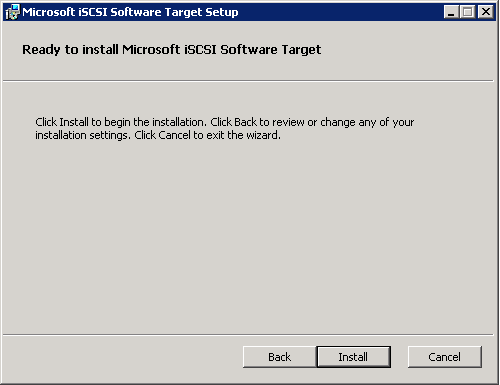
- Klik tombol Install
- Klik tombol Finish

Selanjutnya Configuring iSCSI Target on Windows Server 2008 R2

Thursday, June 28, 2012

Enabling Multicore Processor on Ms. Windows 7

Pada saat ini processor untuk komputer desktop maupun Notebook tersedia dengan mutlicore, tapi secara default sistem operasi Ms. Windows 7 belum memanfaatkan seluruh core yang tersedia hal ini tentu menjadikan kinerja komputer menjadi tidak optimal.

Guna memanfaatkan seluruh kemampuan processor yang dibeli anda harus mengaktfikan dengan melakukan langkah - langkah dibawah ini :
  1. Tekan tombol Start, pilih Run
  2. ketikan msconfig, tekan kunci Enter
  3. Pilih tab Boot, kemudian klik tombol Advance Options
  4. Beri tanda check pada Number of Processor
  5. Pilih jumlah processor sesuai dengan core pada processor yang kamu beli
  6. Klik tombol Apply
  7. Restart
English - Translated By Google

At this time processor for desktop computers and notebooks are available with mutlicore, but by default the operating system MS. Windows 7 not utilizing all available cores make it certainly is not optimal computer performance.
In order to utilize all the capabilities of purchased processor  follow this step by step guide :
  1. Press the Start button, select Run
  2. typing msconfig, press the Enter key
  3. Select the Boot tab, then click the Advanced Options
  4. Put a check in the Number of Processor
  5. Select the number of processor cores on a processor in accordance with what you buy
  6. Click the Apply button
  7. restart

Wednesday, June 27, 2012

Ms. Exchange 2007 Installation Error : 3221684226

Instalasi Ms. Exchange Server 2007 dengan SP1 atau SP2 pada Ms. Windows Server 2008 Enterprise Edition SP1 atau SP 2 mengalami kegagalan dengan kode error 3221684226 pada tahap pertama instalasi yaitu Organization Preparations.

Penyebab error ini tidak terdeteksi pada saat Readiness Check, jadi kita akan mengira bahwa semua pre-requisite telah terpenuhi dan siap untuk proses instalasi.

Error ini disebabkan oleh kurangnya features yang terinstall pada Ms. Windows Server 2008, yaitu :
  • Active Directory Domain Service Tools
  • Remote Server Administration Tools (RSAT)
Jika komponen ini belum terinstall maka pesan error akan muncul dan kamu tidak bisa meneruskan proses instalasi. Jadi pastikan install terlebih dahulu kedua feature diatas.

========================= Translated by Google==============================


Ms. installation. Exchange Server 2007 with SP1 or SP2 on Ms. Windows Server 2008 Enterprise Edition SP1 or SP 2 experiencing error with code 3221684226 on the first phase of installation that is Organization Preparations.

The cause of this error is not detected during the Readiness Check, so we would expect that all pre-requisite has been fulfilled and ready for installation.

This error is caused by a lack of features that are installed on Ms. Windows Server 2008, namely:

  • Active Directory Domain Services Tools 
  • Remote Server Administration Tools (RSAT)

If this component is not installed then the error message will appear and you can not continue the installation process. So be sure to first install the two features above.